Most IPTV players offer a choice between two stream formats, and the setting is easy to ignore. The two are MPEG-TS and HLS. This guide explains what each one does and which to pick, without assuming you need the engineering detail.
The one-line answer
For live viewing on a stable connection, pick MPEG-TS, because it usually has less delay. For catch-up, seeking, or a connection that drops, pick HLS, because it tolerates interruptions better and can jump to a point in the programme. If you are not sure, try the one your provider recommends, then test a busy channel on the other.
What MPEG-TS is
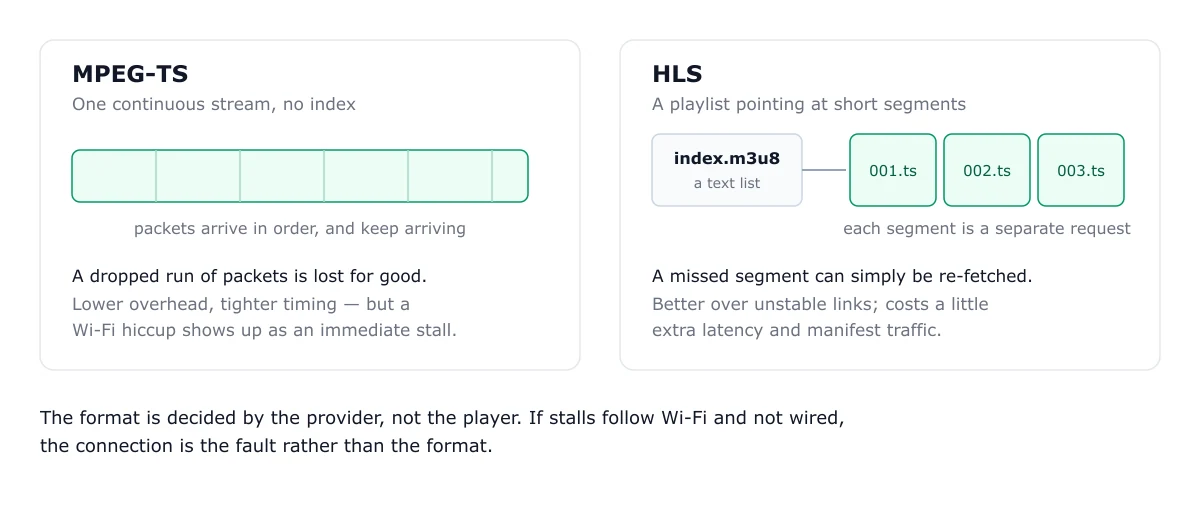
MPEG Transport Stream is a continuous flow of small packets. The player receives the packets and decodes them as they arrive. Because there are no fixed segments to wait for, a live channel can start and update quickly. The trade-off is that a dropped packet can interrupt the picture, and a continuous stream does not offer the random access that catch-up needs.
What HLS is
HTTP Live Streaming splits the video into short segments, and a playlist file lists them in order. The player downloads a few segments ahead, then plays them in sequence. Segments are typically around 10 seconds long. If one fails to download, the player can often retry it, which makes HLS more forgiving on a weak connection. Because each segment is a file with a known position, HLS also supports seeking and catch-up.
Why HLS feels behind live
The player usually waits for several segments before it starts playback, so the picture trails the live broadcast by the length of those segments. Shorter segments reduce this, but providers do not always offer them. If a channel feels noticeably behind a live event, the segment length is a likely cause. TS avoids most of that wait.
Catch-up and seeking
If you use catch-up, rewind, or the programme guide to jump back, HLS is the format that supports it reliably. TS is built for continuous live flow, so random access is limited. This is the main reason a provider may offer HLS even when TS is available.
Reliability on a weak connection
HLS has the edge when the connection is unstable. A missed segment can be fetched again, and the player can buffer more. TS has less margin: a long interruption shows up immediately as a stall. If your channels stall on Wi-Fi but not on a wired connection, that points to the connection rather than the format, and the buffering guide covers the steps.
Which to pick
- Live channels, stable connection, wired or strong Wi-Fi: TS, for lower delay.
- Catch-up, rewind, or a weak connection: HLS, for seeking and tolerance of interruptions.
- Not sure: Test a busy channel in both, and keep the one that stalls less.
The setting sits in the player’s stream or playback options, and the name varies by app. Change one setting, then test the same channel again, so you know which change made a difference. The TiviMate guide shows where the options are in one popular player.
Playlist files and the M3U8 name
The name M3U8 is often confused with the playlist format. M3U8 is a UTF-8 playlist file. An HLS stream uses one to list its segments, and an IPTV provider often uses an M3U file to list channels. For how the channel playlist works, see the M3U playlist explainer.
Bandwidth
Bandwidth depends mainly on the picture quality and bitrate your provider sends, not on the format alone. The real difference is how each format behaves when the connection dips. For the speed you need per stream, see the bandwidth requirements guide.
For the basics of how IPTV is delivered, see what IPTV is. The EPG guide covers catch-up’s programme data.
Frequently asked questions
Is HLS better than MPEG-TS for IPTV?
Neither is better in every case. MPEG-TS usually starts live channels faster with less delay. HLS is more forgiving on an unstable connection and supports seeking, which catch-up needs. Choose by how you watch.
Why does my HLS channel lag behind live?
HLS delivers video in segments, and the player usually waits for several segments before playback starts. That buffering adds delay. A lower-latency TS stream avoids most of it if your connection can sustain it.
What is an M3U8 file?
An M3U8 file is a playlist written in UTF-8. For HLS, it lists the segments of a stream. For IPTV, the playlist file is often an M3U file that points to channels, so the two terms are easy to confuse.