People often ask whether a VPN helps with IPTV. The honest answer is that it changes some things and leaves others alone. A VPN hides your traffic from the network it runs over, and it can route you through a different location. It does not change the legal status of a service, and it does not fix a faulty playlist. This guide sets out what changes, what does not, and how to test whether a VPN is worth it for you.
What a VPN changes, and what it does not
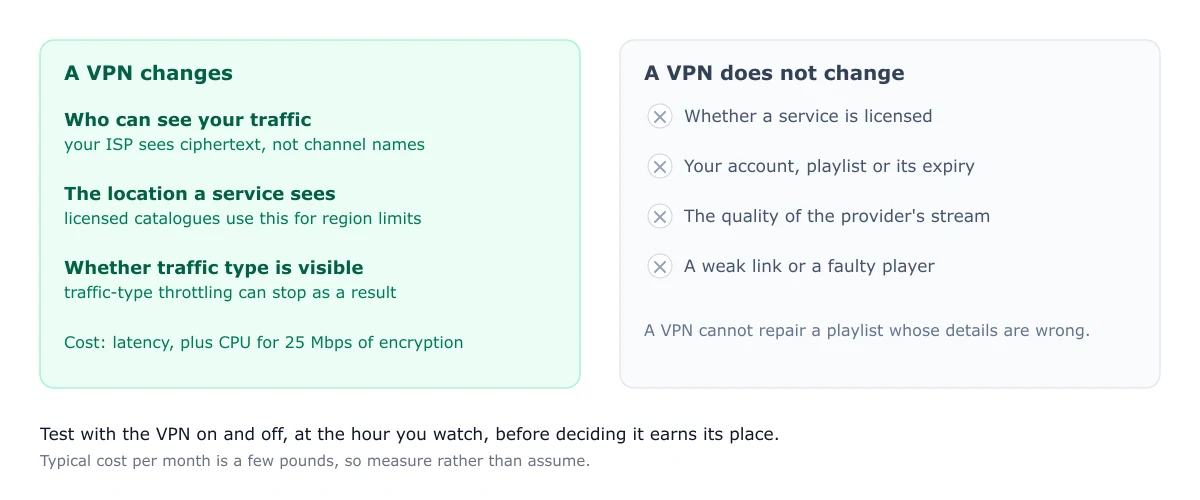
A VPN encrypts the traffic between your device and the VPN server. Your internet provider sees encrypted data and cannot see which channels or sites you are using. The VPN server sees the traffic instead, and it can show a different location to the services you connect to.
A VPN does not change the provider’s account, the licence behind the content, or the quality of the stream. It does not make a playlist load if its details are wrong, and it does not stop the stream from stalling if the connection is weak.
Throttling: the one performance argument that holds up
Some internet providers slow down certain types of traffic at busy times. Because a VPN encrypts the traffic, the provider cannot tell that it is streaming. That can stop throttling based on traffic type. Whether throttling affects you depends on your provider and your plan, so test it rather than assuming. Measure your speed with the VPN on and off, at the hour you usually watch.
Geo-restriction: licensed services versus the rest
A VPN can change the location a service sees you in. Licensed services often limit content by region, so a VPN can make a licensed service appear available from elsewhere. That is a different question from whether a service is licensed in the first place. A VPN does not make an unlicensed service legal, and it does not change the rights behind the content.
Does a VPN make an unlicensed service legal?
No. A VPN changes who can see your traffic. It does not change whether a service is licensed. The legal position of the service and of the viewer depends on the content and the country, and it is covered in the legal guide. Anyone who tells you a VPN makes an unlicensed service legal is wrong.
Where the VPN runs: device, app or router
A VPN can run in three places:
- On the device, as an app. Many phones and computers can do this. Some TV platforms cannot run a VPN client at all.
- In the router, so every device on the network uses it. This is the usual option for smart TVs and sticks that cannot run a VPN app.
- On a separate travel router or box, which adds the VPN to one network without changing the main router.
A router-level VPN means every device on the network is encrypted, which can add load to the router. Check the router’s processing limits before setting it up.
The cost in speed
Encrypting a stream takes processing power. On a weak device or router, a high-bitrate stream can start to stall once the VPN is on, even when the line speed is fine. That is a common cause of new buffering after a VPN is installed. The fix is to measure, not to buy a faster plan: test the same channel with and without the VPN, and compare the result. If the stream stalls only with the VPN on, the device or router is the limit.
For the planning figures for each quality, see the bandwidth guide.
What to look for if you decide you need one
If you decide a VPN is worth it, choose on these points rather than on a ranking:
- A clear, published privacy policy, and a stated logging position.
- Support for the device or router you plan to use.
- Enough speed for your highest-quality stream, measured on your own line.
- A simple way to switch it on and off.
This page does not recommend a brand. Test the options against your own needs.
Watch for scams while you are looking
Some IPTV offers come bundled with a VPN or a discount on one, and some of them are scams. If a seller pushes a specific VPN as part of a cheap IPTV deal, be cautious. The scam guide covers the warning signs.
For the basics of how IPTV is delivered, see what IPTV is. If playback stalls after a VPN change, the buffering guide covers the diagnosis. For running a VPN on Fire TV, see the Fire TV guide.
Frequently asked questions
Does a VPN make IPTV legal?
No. A VPN changes who can see your traffic. It does not make an unlicensed service legal. Whether a service is licensed is a separate question, and it is covered in the legal guide.
Can a VPN stop my ISP throttling IPTV?
It can, because the provider cannot see which traffic is streaming. Whether throttling affects you depends on your ISP and plan. Test your speed with and without the VPN before deciding whether it is worth the cost.
Can I run a VPN on a Fire TV Stick?
Some devices can run a VPN app directly. Others cannot, and that is when a router-level VPN is an option. Check whether the app you need is supported on your device before buying anything.