An electronic programme guide is the difference between IPTV feeling like television and feeling like a folder of video files. It is also the component most likely to arrive broken, because it is a second data feed with its own address, its own expiry, and its own matching rules.
How the guide actually works
Three parts have to line up:
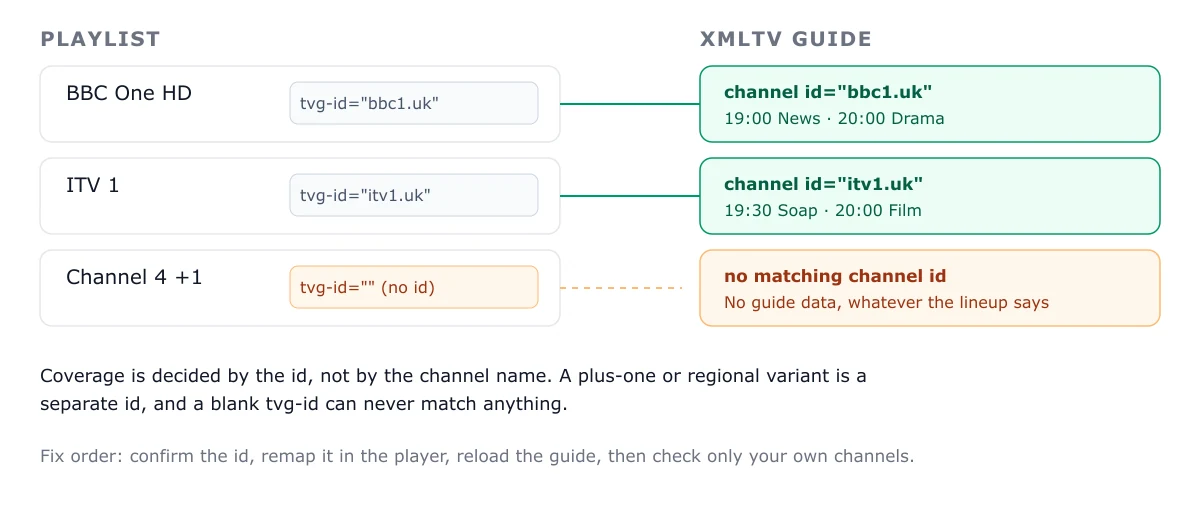
- The playlist entry carries a channel identity, usually
tvg-id. - The XMLTV feed publishes programmes keyed by those identities.
- The player joins the two and renders a grid.
Break any one and you get a guide with holes. The channels still play, which is why this failure feels mysterious.
Playlist:  #EXTINF:-1 tvg-id="bbc1.uk",BBC One
XMLTV:     <channel id="bbc1.uk">...</channel>
           <programme channel="bbc1.uk" start="..." stop="...">...</programme>
If the playlist says bbc1.uk and the guide says BBC1.uk, some players match it and some do not. Case sensitivity is implementation-dependent, which is a useful thing to know before rewriting an entire playlist.
Step 1 — Find the EPG URL
Look at the original provisioning message from your provider. There are almost always two links, labelled inconsistently:
- Playlist: ends in
.m3u,.m3u8, or containsget.php - Guide: ends in
.xml,.xml.gz, or containsxmltv
If only one link was supplied, ask support for the EPG address explicitly — do not assume the playlist URL doubles as the guide.
Step 2 — Enter it in the right field
Players label this differently:
| Player | Where it goes |
|---|---|
| TiviMate | Settings → EPG → Add source |
| IPTV Smarters | Playlist setup → EPG URL |
| XCIPTV | Settings → EPG |
| TV-native apps | Usually during playlist creation |
Paste the full URL. Do not add parameters, and do not switch http to https unless the provider confirms the certificate covers that host.
Step 3 — Assign channels if the guide is partial
Some players auto-match by tvg-id. Others let you map manually: select a channel, choose the correct guide entry, save.
If 90% of channels populate and a handful do not, manual assignment is the practical fix. If nothing populates, do not start mapping — the feed is not loading at all. Check the URL, then check whether the file downloads in a desktop browser.
The four causes of an empty guide
1. Missing or expired EPG URL
Most common by a wide margin. Guides are sometimes issued with a shorter validity than the subscription itself.
2. The feed is gzipped and the player cannot unzip it
.xml.gz sources work in most modern players and fail in older or TV-native ones. Ask for an uncompressed feed, or use a player that handles gzip.
3. Import is still running
A full guide for a large lineup can take five minutes on a budget device. Players often show nothing until it completes. Check the last-updated timestamp rather than judging by the grid.
4. Channel ID mismatch
Names look right, ids do not match. Symptoms: a partial guide where the populated channels seem almost random. Fix by mapping manually or by correcting tvg-id values in a local copy of the playlist — remembering that a hosted playlist will overwrite your edits on refresh.
Setting a refresh interval
Most players default to a daily refresh. Two practical notes:
- Refresh overnight, not at prime time. An import can briefly stall playback on low-power hardware.
- Check retention. Some players keep 3 days of guide data, some 7. If yours keeps 3 and refreshes weekly, you will have gaps every Thursday.
Is a perfect guide realistic?
No, and chasing one wastes evenings. On large international lineups, 80–90% coverage is normal: some feeds carry no programme data at all, and some channels are time-shifted duplicates that map ambiguously.
What matters is that your channels are covered. Build a favourites list of twenty channels, confirm those have correct schedules, and ignore the rest. This also solves the performance problem on constrained hardware — a shorter list parses faster and browses better.
When the guide is wrong rather than empty
Programmes shifted by an hour usually indicate a timezone setting, not a bad feed. Check the player’s timezone override and whether the source publishes UTC or local time. Programmes shifted by exactly the length of a sporting event usually mean the feed is stale — refresh before assuming corruption.
Related
- Playlist mechanics: M3U playlists explained
- Login problems: Xtream Codes explained
- Setting up on a stick: Fire TV setup
Frequently asked questions
Why is my IPTV guide empty when channels work fine?
Because the guide is a separate XMLTV feed with its own URL and its own expiry. The playlist and the EPG are independent: one can work perfectly while the other is missing or stale. Find the second link your provider supplied and add it in the EPG field.
What does tvg-id do?
It links a playlist entry to a programme entry in the guide file. If the id in the playlist does not exist in the XMLTV source, that channel gets no programme data even though it plays. Mismatched ids are the most common reason a guide is partially populated.
How often should an EPG refresh?
Every 12 to 24 hours is typical. A guide that never refreshes usually has a cached file, a URL that has expired, or an import that is failing silently. Check the player's last-updated timestamp after each change.
Can I use a public EPG service instead of my provider's?
Yes, and it often improves coverage — public XMLTV sources map to standard channel ids well. The trade is manual mapping work: you will need to confirm that each of your channels resolves to the right programme entry, or you will get correct schedules for the wrong channels.