IPTV stands for Internet Protocol Television. That is the whole definition, and it is less exciting than the marketing suggests: television delivered as data packets over an IP network, rather than as a radio signal from a satellite dish or a coaxial cable.
Everything else — the channel lists, the subscription prices, the “anti-freeze technology” badges — is built on top of that one fact. Understanding the delivery method explains both what IPTV is good at and why it fails in the specific ways it does.
The four parts of any IPTV setup
Every IPTV system, from a national broadcaster’s app to a two-person reseller, has the same four components.
| Part | What it does | Where it fails |
|---|---|---|
| Source | Holds or captures the feed | Overloaded servers during peak events |
| Middleware | Authenticates the account and serves channel metadata | Slow logins, empty EPGs, “failed to authorize” |
| Transport | Moves the stream to you | Your Wi-Fi, your ISP’s peering, congestion |
| Player | Decodes and displays the stream | Codec support, hardware decoding, app bugs |
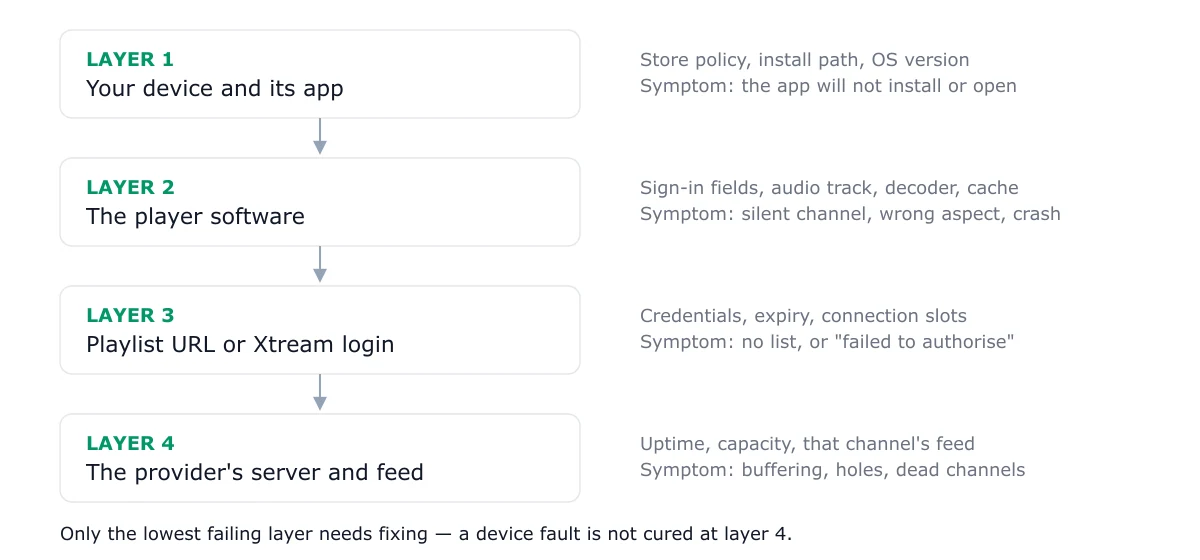
Most troubleshooting advice in this market starts at the source — blaming the provider — because that is the part the provider controls. In practice, the transport and player layers account for a large share of the problems readers report. A 1080p stream glitching at 20:40 on a congested 2.4 GHz Wi-Fi band is not evidence of a bad subscription.
What you actually need before you start
The hardware list is shorter than most guides imply.
- A connection that holds 15 Mbps for HD, or 25 Mbps for 4K, at the hour you watch. Measure it then, not at noon.
- A supported device. Fire TV Stick, Android TV or Google TV, Apple TV, Roku, or a recent LG or Samsung smart TV.
- One player app. IPTV Smarters, TiviMate, XCIPTV, or a built-in television player.
- Credentials from a service you have chosen. A username, password, and usually a server URL or an M3U link.
That is the entire list. A “4K HDMI cable” and a “gaming router” are not required, and a provider who insists otherwise is selling hardware rather than television.
On the player, specifically
The player matters more than people expect. Two readers with the same subscription and similar hardware can have completely different outcomes, because players differ in three ways that matter:
- Hardware decoding. A player that decodes in software on a Fire TV Stick will stutter at bitrates a hardware-decoding player handles easily.
- EPG handling. Some players parse a 60,000-entry guide in seconds; others hang for a minute on every launch.
- Buffer strategy. A generous buffer protects against jitter but delays channel changes. The trade-off is a design choice, not a defect.
We test players separately for exactly this reason: the best IPTV player apps ranks them by hardware decoding and guide handling rather than by interface screenshots.
Live TV, catch-up and VOD are three different things
A modern IPTV subscription usually bundles three services that behave differently:
- Linear channels — a scheduled stream. Time-sensitive. Intolerant of packet loss.
- Catch-up — previously broadcast programmes, served on demand. Forgiving, because it is a file, not a live feed.
- VOD — a film and series library. Largest storage footprint, least time-sensitive.
When someone says “IPTV is buffering but Netflix is fine”, the comparison is usually invalid: Netflix serves a pre-encoded file from a CDN with adaptive bitrate, while the live channel is a single bitrate stream from one server. Different problems, different fixes.
The legal distinction that matters
IPTV is not a grey area as a technology. Broadcasters, telecoms and public service media all use it. The question is whether the service you are paying holds the rights to retransmit the channels it offers, in your country.
That reduces to a set of questions you can actually ask before paying:
- Who is the legal entity taking your payment, and where is it registered?
- Which territories is the service licensed for?
- What happens if a channel is removed for rights reasons?
- Is there a written refund and cancellation policy?
A provider that answers these in plain text is behaving like a business. A provider that answers with channel counts is behaving like an advertisement. Our selection guide turns this into a scoring sheet; the trust and safety section covers the rest.
Where IPTV is genuinely better than cable
It is worth stating the real advantages, because they are the reason the category exists:
- No installation visit and no rented box. Hardware you already own is the receiver.
- Multi-room without extra wiring. Simultaneous connections are a billing setting, not a cable run.
- Instant cancellation in most cases. Monthly cycles are common; long contracts are not.
- Portability. The same account works on a phone or a laptop away from home, subject to the provider’s rules.
- Cheaper regional access. Expatriate viewers can often get home-country channels without a satellite dish.
The trade is that quality now depends on your own connection at the exact moment you are watching. That is why every honest recommendation ends the same way: test during peak hours, on your own network, before committing to a long plan.
A sensible first week
- Read the provider checklist and shortlist two services, not ten.
- Take a short trial on both — no annual plans yet.
- Install one player on one device and get it working before adding anything else.
- Run a peak-hour test: a live news channel, a live sports event, and one VOD title.
- Only then decide whether a longer cycle is worth the discount.
If a step in that sequence feels like a leap of faith, the free trial guide explains how to read what a trial does and does not prove. And if you hit an error on day one, it is probably one of the four failures covered in IPTV troubleshooting — not a reason to buy a new television.
Frequently asked questions
Is IPTV the same thing as streaming?
Not quite. Streaming usually means on-demand video from a catalogue — Netflix, iPlayer, Prime Video. IPTV is television delivered over a managed data connection, so it includes linear channels with a schedule, plus catch-up and video on demand. The same network carries both, but the protocol behaviour is different: live IPTV is time-sensitive, on-demand video is not.
What internet speed do I need for IPTV?
A steady 15 Mbps for HD and about 25 Mbps for 4K, per stream. The word 'steady' matters more than the peak figure: a 200 Mbps line that drops to 4 Mbps under contention performs worse than a stable 40 Mbps line. Test during your usual viewing hour, not at midday.
Do I need a special box?
Usually not. A Fire TV Stick, an Android TV device, an Apple TV, or a recent smart TV can all run a player. A dedicated box helps mainly on older televisions whose app store no longer receives updates.
Why do channel counts differ so much between providers?
Because nothing enforces them. Counts are self-reported and usually include regional duplicates, standard-definition mirrors, and radio channels. A provider claiming 50,000 channels may carry fewer distinct English-language HD channels than one claiming 12,000.
Is IPTV legal?
The technology is entirely lawful — major broadcasters use it. Legality depends on whether the specific service holds retransmission rights for the channels it carries in your country. That is a question about the provider's agreements, not about IPTV as a delivery method, and it is not something this site can settle for you.