An M3U playlist has a reputation for being technical. The format itself is about as simple as a text file gets: a list of entries, each with a stream URL and some optional metadata. Everything confusing about M3U playlists comes from how they are distributed, not from what they are.
If you were issued a playlist by a provider you have chosen, this explains what to do with it. If you are looking for a playlist to use, this site does not publish them — see the trust and safety section for why.
What the file looks like
A minimal playlist:
#EXTM3U
#EXTINF:-1 tvg-id="news.uk" tvg-logo="https://example.com/logo.png" group-title="News",Channel Name
https://stream.example.com/live/12345/index.m3u8
#EXTINF:-1 group-title="Sports",Another Channel
https://stream.example.com/live/67890/index.m3u8
That is the entire structure. Two directives and one URL per channel.
#EXTM3Umust be the first line. Without it, some players reject the file.#EXTINF:-1introduces an entry. The-1is a duration placeholder meaning “live/unknown”.tvg-idlinks the channel to an entry in the EPG. This is the field that decides whether your guide has programme data.tvg-logois the channel icon. Cosmetic, but it adds load time on large lineups.group-titlecreates categories in the player.- The final line is the stream itself.
Three ways the same playlist reaches you
| Method | What you paste | Refresh behaviour |
|---|---|---|
| Hosted URL | One long link | Updates automatically when the provider changes the lineup |
| Local file | A downloaded .m3u file | Static; you must re-import after lineup changes |
| Xtream Codes | Server, username, password | Dynamic; no playlist file involved |
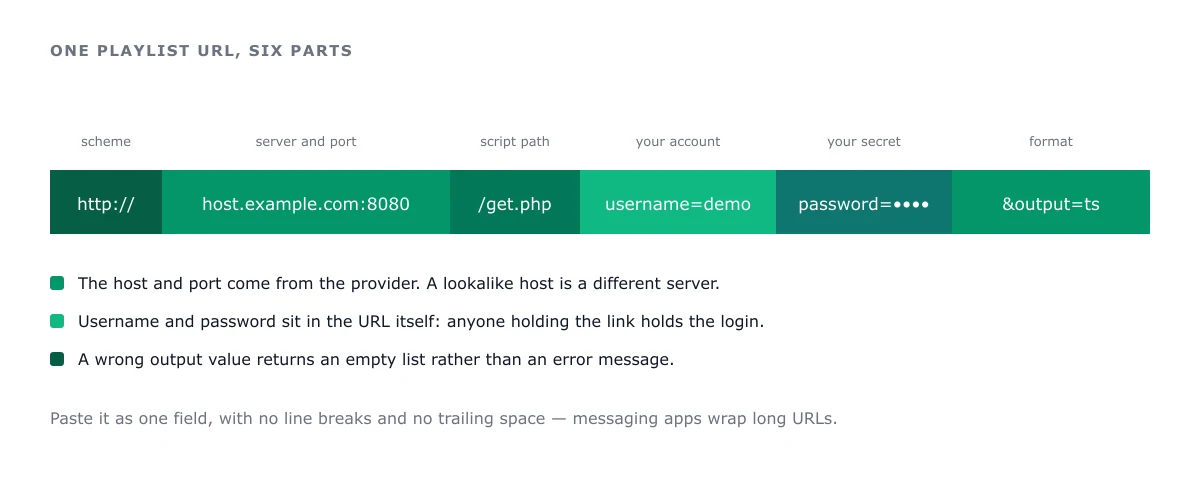
Hosted URLs are the norm. They often contain your username and password as query parameters or path segments, which is why they should be treated as secrets: anyone with the link has your account.
Do not post a playlist URL in a forum to ask why it is not working. That is how accounts get shared without your knowledge.
Playlist URL vs EPG URL
This is the most common point of confusion, and it explains most “channels work but the guide is empty” complaints.
- The playlist URL returns the channel list.
- The EPG URL returns XMLTV programme data — a separate file, often at a different hostname.
Providers frequently send both in one email, labelled inconsistently. If your guide is blank, the playlist is not the problem: look for a second link, often ending in .xml, .xml.gz, or containing xmltv.
Four reasons a playlist shows nothing
1. Expired or suspended account
The playlist loads because it is a cached response, but every stream returns an error. Check the account status with the provider before changing anything locally.
2. Truncated URL
Playlist URLs are long, and messaging apps wrap them. Re-copy from the original source, paste into a plain-text editor first, and confirm the end of the string — especially any token or expiry parameter.
3. Hostname changed
Providers migrate servers. A URL pointing at a retired host will hang or fail with a DNS error. Ask support for the current host rather than guessing.
4. User-agent or geo restriction
Some providers restrict access by country or expect a particular player’s user agent. This is invisible in the app: the playlist loads, streams fail. It is one of the few situations where a VPN genuinely changes the outcome — though it is worth confirming with the provider that the restriction exists before adding one.
Should you edit your playlist?
It is safe and occasionally worth it:
- Delete channels you will never watch, to cut guide parse time.
- Fix
tvg-idvalues that do not match your guide source. - Rename groups so they sort sensibly.
The catch is that hosted playlists refresh, overwriting edits. Most players handle this with persistent favourites, which is the better mechanism than editing the file. On constrained hardware, cutting the channel list is the single most effective performance fix available — a favourites list of twenty channels makes a Fire TV Stick Lite feel like a different device.
When Xtream Codes is the better option
If your provider offers Xtream Codes credentials, prefer them. The advantages are practical:
- Shorter credentials — three fields instead of a 200-character URL.
- The provider can add channels without you re-importing anything.
- Fewer transcription errors, which is the leading cause of setup failure.
The trade is that you cannot inspect or edit the lineup locally. For most readers that is an acceptable loss. Xtream Codes explained covers the credential structure and the fields each player asks for.
Next steps
- Guide not populating: the EPG guide
- Playlist loads, streams fail: authorization errors
- Everything stutters: buffering fixes
Frequently asked questions
What is the difference between M3U and M3U8?
M3U8 is an M3U file saved with UTF-8 encoding, and in practice it usually signals an HLS stream rather than a raw transport stream. Players treat them interchangeably in most cases; the distinction matters mainly for compatibility with specific codecs and devices.
Why does my playlist load but show nothing?
In order of likelihood: the account has expired, the URL was truncated when copied, the provider rewrote the hostname, or the playlist requires a user agent the player is not sending. Check the URL first — copy it again from the original message rather than from a saved note.
Can I edit an M3U file myself?
Yes. It is plain text. You can remove dead channels, rename groups, and fix broken EPG references. Keep a backup, because a provider refresh will overwrite your edits unless the player supports persistent favourites.
Do I need a playlist if I have Xtream Codes credentials?
No. Xtream Codes is an API-based login that returns the channel list and guide dynamically. It is generally preferable because the provider can update lineups without you re-importing a file, and because credentials are shorter and less prone to transcription errors.