An IPTV playlist that stops loading usually shows a message about expiry, but the message covers more than one fault. A lapsed subscription, a rotated address or token, and a wrong device clock all look similar on screen. Each needs a different fix, and reinstalling the app fixes none of them. This guide shows how to separate the three.
Two failures, one message
A playlist can stop working for two broad reasons. The first is that the subscription has ended. The second is that the access details have changed: the server address, the playlist URL or the token has been rotated, or the provider has blocked the old one. A third, less obvious cause is the device itself. If its clock is wrong, authorisation checks can fail and look like an expiry. Treat all three as possible until you have tested.
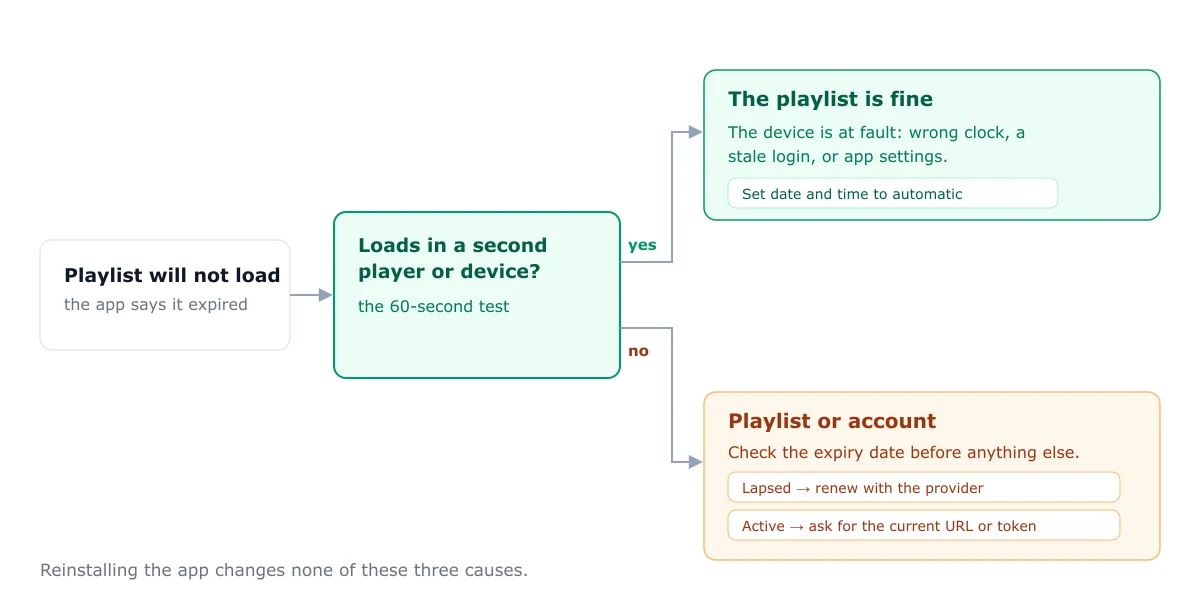
The 60-second test
Take the same details to a second player, or try the playlist on a second device on the same network.
- It loads on the second device or player. The playlist is not expired. The fault is on the first device, in the app’s settings, or in its clock. Go to the device-clock step below.
- It fails on both. The fault is with the playlist or the account. Check the expiry date and whether the details have changed, using the provider’s own channels.
This test is the fastest way to avoid wasted effort, and it takes about a minute.
Case 1: the subscription has lapsed
If the account has ended, no change to the app or device will restore it. Check the expiry date your provider gave you. If you were given a date and it has passed, the account needs renewing through the provider. This site does not sell or link to subscriptions, so the provider is the place to ask.
Case 2: the URL or token has rotated
Some providers change the server address, playlist URL or access token. The old details then stop working even though the account is active. If you did not receive new details, ask your provider whether the address has changed, and enter the new details exactly as sent. The playlist explainer covers how a playlist URL is structured and why a changed part breaks it.
If the failure message is about authorisation, the failed to authorise guide covers the causes in order.
Case 3: the device clock is wrong
This is the false positive. A device with the wrong date or time can fail authorisation checks, and the message can read as expired. Set the date and time to automatic, restart the device, and test again. If the playlist loads after that, the clock was the cause, and no change to the account was needed.
Refreshing without losing favourites
If the playlist loads again after a fix, you may want to keep your favourites and groups. Most players keep them when you update or refresh the playlist details, but check before deleting the playlist. Removing the playlist entry usually removes its favourites too.
When to contact your provider
Contact the provider when the second-device test fails, the clock is correct, and you have not received new details. Send the sign-in type, the exact error text, the device, the time the fault started, and whether it loads anywhere else. That gives them what they need to tell an expiry from a changed address.
For playback faults once a playlist loads, see the buffering guide. For a general check when nothing loads, see the not working guide.
Frequently asked questions
How do I know if my IPTV playlist has expired?
Try the same details in a second player or on a second device. If it loads there, the playlist is not expired, and the fault is on the first device or in its settings. If it fails on both, check the expiry date with your provider.
Can my device clock cause an expired playlist error?
Yes. If the date or time on the device is wrong, some authorisation checks fail, and the error looks the same as an expiry. Set the date and time to automatic, restart the device, and test again.
What should I send my provider when a playlist stops working?
Send the sign-in type, the exact error message, the device you are using, the time the fault started, and whether the playlist loads on any other device. That lets them tell an expiry from a changed address quickly.