Most IPTV comparison pages are ordered backwards. They start with the channel count, move to the price, and end with stability almost as an afterthought — which is exactly the order in which those factors matter least.
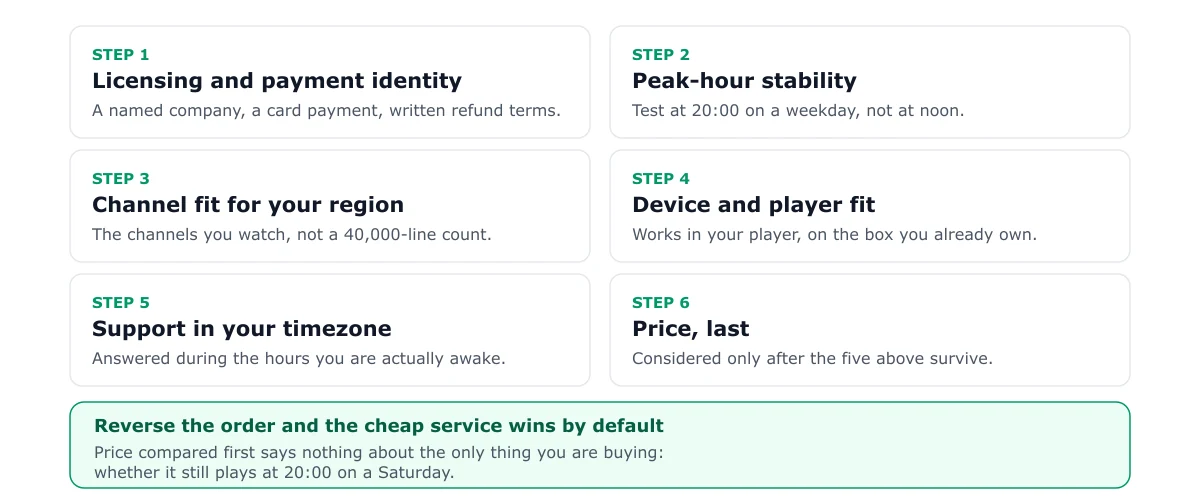
The order below is the one that filters out bad providers fastest, because each step removes a whole category of failure before you spend time on the next.
Step 1 — Licensing and payment identity
Before anything technical: who is taking your money?
- A named legal entity on the checkout page, not just a brand and a Telegram handle.
- A payment processor you recognise, with a stated merchant name that matches the entity.
- A written refund and cancellation policy on a page you can read before paying.
- A stated territory the service is authorised for.
This step is first because it is structural. A provider without these details cannot be made reliable by any amount of streaming quality, and no troubleshooting guide can recover your money for you.
A provider that hides the company name is not being discreet. It is arranging to be difficult to find later.
Step 2 — Peak-hour stability
Now the part that actually decides your evenings.
Ask for a trial and use it at the hour you watch. During that trial, test three things:
- A live news channel for ten minutes — the most forgiving live test.
- A live sports event if one is on — the real stress case, because everyone else is watching the same feed.
- Channel switching between five channels you care about. How long does each take?
Measure start-to-first-frame. Under three seconds is good; over eight seconds suggests server-side contention or a player parsing problem.
A provider that performs well here has done the expensive part of the job. A provider that blames your Wi-Fi during a trial is telling you what support will look like later.
Step 3 — Channel fit for your region
This is where channel counts belong: third, and in a much narrower form.
Instead of asking how many channels exist, ask: which of the twenty channels I actually watch are present, in HD, for my region? Write the list down before you shop. Then check it against any published lineup.
Two providers claiming 50,000 channels can differ enormously in how many distinct English-language HD channels they carry. Totals inflate through regional duplicates, SD mirrors and radio stations, and no one audits them.
| Claim | What it usually means | How to verify |
|---|---|---|
| 50,000+ channels | Global total including duplicates and mirrors | Search your 20-channel list |
| 4K channels | A small subset, often event-only | Ask which channels, then check |
| 99.9% uptime | No published measurement method | Peak-hour trial, twice |
| Anti-freeze technology | Typically a larger buffer | Check channel-change latency |
| 150,000 VOD titles | Often the same public library as rivals | Search for three recent releases |
Step 4 — Device and player compatibility
Check the provider’s setup instructions against your hardware before paying. Two questions matter:
- Which players does the provider document, and are those players available on your device’s store?
- Does the provider supply an EPG, and is it included in the price or an extra?
If you are on an Apple TV, a Roku, or a Samsung television, confirm the player exists in that store. Sideloading is a Fire TV and Android TV privilege, not a universal one. Our device hub lists what each platform permits.
Step 5 — Support that answers in your timezone
Support quality is testable during a trial. Open a ticket before you buy and time the response. Ask something specific and slightly awkward, such as “which channels are 4K, and are they available in my region?”
You are not looking for a fast reply. You are looking for a reply that answers the question. A canned response within a minute is worth less than a specific one within an hour.
Step 6 — Price, last
Only now does price belong in the conversation, and it should be judged per usable month rather than per month advertised.
- Monthly: highest per-month cost, lowest exposure. The correct starting point.
- Quarterly or six-month: the typical compromise after a good trial.
- Annual: the lowest headline figure and the largest bet. Justified only after months of stability.
The pricing breakdown explains what each cycle really costs when things go wrong, including the math on a failed annual plan.
The red flags that end the conversation
Any one of these is a reason to walk away, not a reason to negotiate:
- No legal entity on the payment page.
- No refund policy, or a policy that excludes “service interruption”.
- Channel count as the only answer to every question.
- Contact only through a chat app, with no email record.
- Pressure to buy an annual plan before any trial.
- Requests for payment by gift card, crypto only, or bank transfer to a personal name.
- Instructions to install from an unknown APK host rather than a documented source.
That last one deserves emphasis: sideloading a legitimate player from its official repository is normal on Fire TV. Sideloading a modified build from a file locker is how devices get compromised.
A shortlist that stays short
Two providers, one trial each, one peak-hour test, and a written record of what you saw. That takes an evening and produces a decision you can defend.
If you want the structured version of this process, the free trial guide turns it into a scoring sheet. If you have already chosen and something is failing, start with the authorization errors guide or buffering fixes before assuming the provider is at fault.
Frequently asked questions
What is the single most useful question to ask an IPTV provider?
'Which channels do you carry in HD for my region, and what happens if one is removed?' It forces a specific answer about the actual product, rather than a total channel count that no one audits. If the reply is another number, you have learned what you needed to know.
Are free trials worth using?
Yes, but only as a peak-hour test rather than a demo. A trial taken on a Tuesday afternoon proves the servers work when nobody is watching. Take it on a Saturday evening or during a live event, and test the specific channels you actually intend to watch.
Is a cheaper annual plan better value?
Only after a stable monthly cycle. The annual discount is real, but its value depends entirely on the service surviving twelve months. A $100 plan that fails in month three cost more per usable month than three separate $15 months would have.
How many connections do I need?
Count the screens that will stream simultaneously, then add one. A phone casting to a television usually consumes a connection, and households routinely underestimate by one.
Should I choose a provider with 50,000 channels?
Only if the count reflects distinct channels you want, in your language, at the quality you need. In practice totals inflate through regional duplicates, SD mirrors and radio. A provider with 12,000 distinct HD channels can easily beat one claiming 50,000.